Adaptive Media Serving using Service Workers
Pairing with @Ester Martí
Visiting a website over a slow network connection takes ages to load, making the experience painful or impossible.
Web developers often forget load performance while adding fancy features. But users likely browse on mid-range or low-end mobile devices with 3G connections at best--not the latest MacBook Pro on gigabit fiber.
In 2018, 52.2% of all global web pages were served to mobile phones.
Performance matters, and media delivery consumes the most resources. We'll adapt media delivery based on network connection using the Network Information API. This improves an experiment I built with @Eduardo Aquiles as a React component, similar to Max Böck's article on connection-aware components--but using service workers.
The Network Information API
The Network Information API is a draft specification exposing device connection information to JavaScript.
The interface provides several network attributes. The most relevant here:
- type: The connection type that the user agent is using. (e.g. ‘wifi’, ‘cellular’, ‘ethernet’, etc.)
- effectiveType The effective connection type that is determined using a combination of recently observed rtt and downlink values. (see table)
- saveData Indicates when the user requested a reduced data usage.
effectiveType values
| ECT | Minimum RTT (ms) | Maximum downlink (Kbps) | Explanation |
|---|---|---|---|
| slow‑2g | 2000 | 50 | The network is suited for small transfers only such as text-only pages. |
| 2g | 1400 | 70 | The network is suited for transfers of small images. |
| 3g | 270 | 700 | The network is suited for transfers of large assets such as high resolution images, audio, and SD video. |
| 4g | 0 | ∞ | The network is suited for HD video, real-time video, etc. |
Browser support
The API lacks full browser support but works in the most popular mobile browsers--where this technique has the greatest impact.
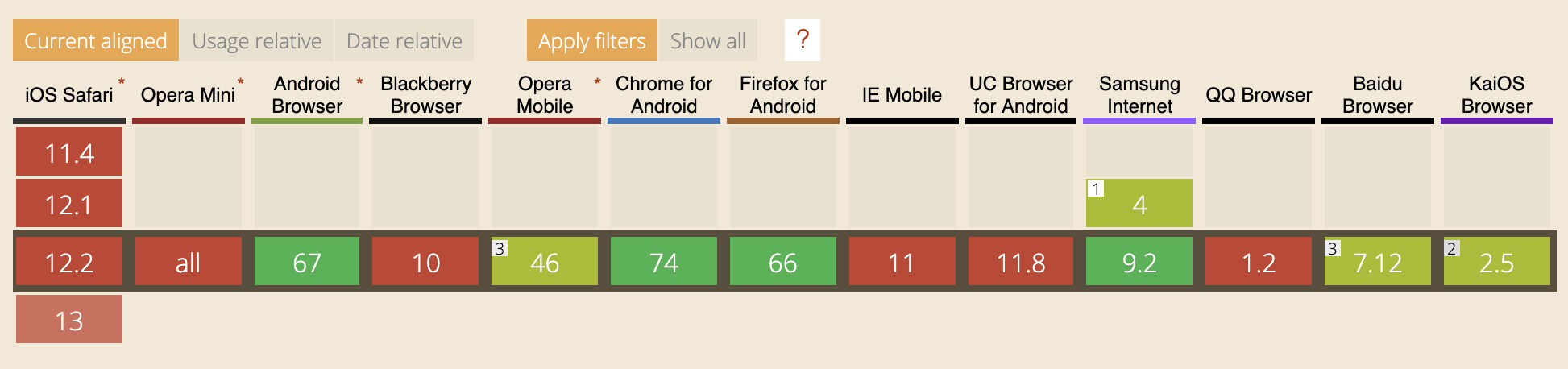
In fact, 70% of mobile users have this API enabled on their device.
Adaptive Media Serving
We'll serve different media resources based on effectiveType. "Different
media" could mean switching between HD video, HD image, or low-quality image, as
Addy Osmani suggests.
This example uses different compression levels for the same image.
First, get the proper quality based on network conditions:
function getMediaQuality() {const connection =navigator.connection ||navigator.mozConnection ||navigator.webkitConnection;if (!connection) {return "medium";}switch (connection.effectiveType) {case "slow-2g":case "2g":return "low";case "3g":return "medium";case "4g":return "high";default:return "low";}}
Imagine an image server accepting a quality query parameter (low,
medium, or high). Set the quality in the src attribute:
<img src="http://images.magarcia.io/cute_cat?quality=low" alt="Cute cat" />
const images = document.querySelectorAll("img");images.forEach((img) => {img.src = img.src.replace("low", getMediaQuality());});
The default quality is low, so devices load the low-quality image first, then
upgrade on high-speed connections.
The JavaScript gets all images and replaces the quality parameter based on
getMediaQuality. For low quality, no additional requests occur. For medium
or high, two requests happen: one for low when parsing the img tag,
another for better quality when JavaScript executes.
This improves load times on slow networks but doubles requests on fast connections, consuming extra data.
Using Service Workers
Service workers solve the double-request problem by intercepting browser requests and replacing them with the appropriate quality.
First, register the service worker:
if ("serviceWorker" in navigator) {window.addEventListener("load", function () {navigator.serviceWorker.register("/sw.js").then(function (registration) {console.log("ServiceWorker registration successful with scope: ",registration.scope,);},function (err) {console.log("ServiceWorker registration failed: ", err);},);});}
Add a fetch event listener that appends the right quality parameter to image requests:
self.addEventListener("fetch", function (event) {if (/\.jpg$|.png$|.webp$/.test(event.request.url)) {const url = event.request.url + `?quality=${getMediaQuality()}`;event.respondWith(fetch(url));}});
Now omit the quality parameter from img tags--the service worker handles it:
<img src=“http://images.magarcia.io/cute_cat” alt=“Cute cat”/>
The code
Find the complete, cleaner code in this GitHub repo.